Serial communication protocols in embedded system design are essential for enabling reliable data exchange between microcontrollers, sensors, and peripheral devices. From simple UART debugging to complex CAN-based automotive networks, choosing and implementing the right protocol directly impacts system performance, reliability, and scalability.
In this guide, we’ll cover types, comparisons, real-world use cases, and best practices to help you design robust embedded communication systems.
What are serial communication protocols in embedded systems?
Serial communication refers to transmitting data one bit at a time over a single channel, reducing wiring complexity and cost compared to parallel communication.
These protocols are widely used in embedded systems for:
- Sensor communication
- Device interfacing
- Industrial automation
- Automotive networks
Types of Serial Communication Protocols
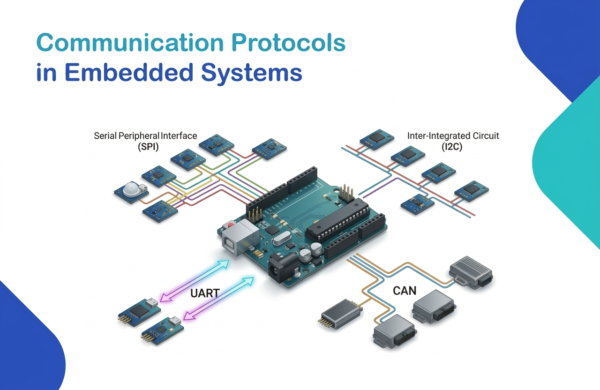
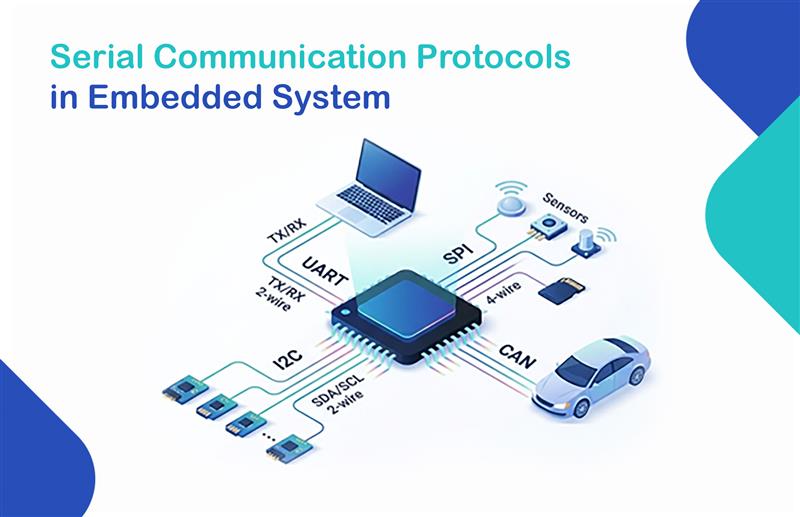
1. UART (Universal Asynchronous Receiver-Transmitter)
- Simple, point-to-point communication
- No clock signal required
- Used in debugging, GPS modules, Bluetooth
2. SPI (Serial Peripheral Interface)
- High-speed, full-duplex communication
- Master-slave architecture
- Used in displays, SD cards, ADCs
3. I2C (Inter-Integrated Circuit)
- Multi-master, multi-slave communication
- Uses only 2 wires (SDA, SCL)
- Ideal for sensors, EEPROM, RTC
4. CAN (Controller Area Network)
- Highly reliable and noise-resistant
- Used in automotive and industrial systems
- Supports multiple nodes
UART vs SPI vs I2C vs CAN
| Protocol | Speed | Complexity | Devices | Use Case |
|---|---|---|---|---|
| UART | Low | Low | 2 | Debugging, GPS |
| SPI | High | Medium | Multiple | Sensors, Displays |
| I2C | Medium | Low | Multiple | Low-speed peripherals |
| CAN | Medium | High | Many | Automotive systems |
How to Choose the Right Serial Communication Protocol
When selecting a protocol, consider:
- Speed requirements → SPI for high speed
- Number of devices → I2C or CAN
- Distance & noise → CAN
- Hardware complexity → UART
Best Practices for Serial Communication Protocols in Embedded Systems
1. Select the Right Protocol for Your Application
Choosing the correct protocol ensures efficient communication and reduces system overhead in embedded systems.
Here are some simple guidelines:
- UART → best for simple, point-to-point communication
- SPI → ideal for high-speed data transfer
- I2C → suitable for connecting multiple devices on a single bus
- CAN → recommended for harsh and noisy environments
Selecting the right protocol improves performance, reliability, and system scalability.
2. Optimize Baud Rate and Clock Speed
Proper configuration of the baud rate and clock speed is essential for reliable communication between devices.
Incorrect settings can lead to:
- Data corruption
- Synchronization errors
Always ensure that the transmitter and receiver are configured with matching settings to maintain accurate data transfer.
3. Implement Error Detection Mechanisms
Error detection is essential to ensure reliable communication and maintain data integrity in embedded systems.
You can use the following techniques:
- Parity bits (UART) to detect simple transmission errors
- CRC (SPI, CAN) to verify data accuracy
- ACK/NACK (I2C) to confirm successful data reception
These mechanisms help identify errors early and allow the system to handle communication failures effectively.
4. Use Interrupt-Based Communication
Instead of using CPU-intensive polling, interrupt-based communication allows the microcontroller to respond only when data is available.
Benefits include:
- Better performance
- Faster response time
- Efficient multitasking
Using interrupts helps reduce CPU load and improves overall system efficiency.
5. Manage Buffers and Flow Control
Proper buffer management and flow control are essential to prevent data loss during communication.
To ensure smooth data transfer, use:
- FIFO buffers to store incoming and outgoing data efficiently
- RTS/CTS (hardware flow control) to manage data transmission between devices
- XON/XOFF (software flow control) to control data flow using special characters
These techniques help avoid buffer overflow and ensure reliable communication between devices.
6. Reduce Noise and Signal Interference
Signal Integrity in Serial Communication

Noise and electromagnetic interference (EMI) can affect serial communication and cause data errors. To ensure reliable communication, follow these best practices:
- Use twisted pair cables to reduce electromagnetic interference
- Keep PCB traces short to minimize signal distortion
- Use shielded cables in noisy environments
- Add termination resistors (120Ω in CAN) to maintain signal integrity
7. Optimize Power Consumption
For low-power embedded systems, optimizing communication can significantly reduce energy usage and improve battery life.
Follow these best practices:
- Use sleep modes when communication is idle
- Reduce clock speeds without affecting data reliability
- Minimize unnecessary communication to save power
- Use interrupt-based communication instead of continuous polling
- Choose low-power communication protocols when possible
8. Test and Debug Thoroughly
Testing and debugging are essential to ensure reliable serial communication protocols in embedded system design.
Use the following tools:
- Logic analyzers to capture and analyze digital signals
- Oscilloscopes to observe signal timing and waveform quality
- Serial monitors (like PuTTY, RealTerm) to send and receive data
Always test your system under real-world conditions, including noise, long cables, and different loads, to ensure stable communication.
9. Implement Security Measures
To protect communication from unauthorized access and data breaches, follow these practices:
- Encrypt data to prevent unauthorized reading of transmitted information
- Use authentication mechanisms to ensure only trusted devices can communicate
- Validate data integrity using checksums or CRC to detect tampering or corruption
These measures help secure your system against attacks and ensure safe data transmission.
10. Keep Firmware and Drivers Updated
Keeping firmware and communication drivers updated is important for maintaining reliable system performance.
Regular updates help to:
- Fix bugs and known issues
- Improve compatibility with new devices and components
- Enhance overall system performance
Updating firmware also helps ensure long-term stability and reduces unexpected communication errors.
Real-World Applications
- UART → GPS modules, Bluetooth
- SPI → SD cards, displays
- I2C → sensors, EEPROM
- CAN → automotive ECUs
Conclusion
Implementing serial communication protocols in embedded system design requires careful planning, correct configuration, and robust error handling. By choosing the right protocol, optimizing performance, and ensuring reliability, developers can build scalable and efficient embedded solutions.
If you want to create high-performance embedded systems with optimized communication, focusing on these best practices will give you a strong competitive edge.
At Monarch Innovation, we specialize in delivering advanced embedded system solutions with efficient and reliable communication protocols. Our expertise helps businesses build scalable, high-performance, and future-ready embedded products.
Looking to enhance your embedded system project? Contact Monarch Innovation today and take your design to the next level.
FAQs
What are serial communication protocols in embedded systems?
They are methods used for data transfer between embedded devices using a single communication line.
Which is faster: SPI or I2C?
SPI is faster because it uses dedicated lines and full-duplex communication.
Why is CAN used in automotive systems?
CAN is highly reliable and resistant to noise, making it ideal for harsh environments.
What is the difference between UART and SPI?
UART is asynchronous and simple, while SPI is synchronous and faster.
How do I choose the right communication protocol?
Consider speed, number of devices, distance, and system complexity.
Which protocol is best for embedded systems?
The best protocol depends on the application. SPI is best for high speed, I2C for multiple devices, UART for simplicity, and CAN for reliability.