
In the rapidly evolving digital ecosystem, delivering fast, responsive, and visually engaging mobile applications is essential for brands aiming to stand out. As businesses increasingly prefer solutions that reduce both development time and cost, cross-platform mobile development has emerged as the ideal approach for building powerful apps that run efficiently on both iOS and Android. Leveraging a unified codebase while ensuring native-like performance allows teams to create scalable mobile experiences with exceptional UI and UX.
As a leading mobile app development company in India, Monarch Innovation specialises in delivering cross-platform applications that offer outstanding UI and UX performance. Backed by strong engineering capabilities and modern frameworks, we ensure that every app is optimised for speed, usability, and visual consistency. This guide outlines the key best practices required to excel in cross-platform mobile development and deliver a premium mobile experience to users worldwide.
Understanding the Strength of Cross-Platform Mobile Development
At its core, cross-platform mobile development allows developers to build applications using shared code, significantly accelerating time-to-market and improving cost efficiency. Whether using Flutter, React Native, Xamarin, or another mobile app development framework, this approach delivers exceptional UI consistency and performance when executed with precision. Businesses benefit from:
- Faster development cycles
- Lower maintenance overhead
- Simultaneous deployment on Android and iOS
- Consistent user experiences across devices
As global demand for mobile-first solutions continues to rise, cross-platform mobile development has proven to be a powerful strategy for delivering high-quality applications rapidly and affordably.
Designing a High-Performance UI Across Platforms
1. Adopt a Consistent, Scalable Design System
An intuitive, visually cohesive design system is essential for excellent mobile experiences. While shared components improve consistency, it is equally important to respect platform-specific expectations. We ensure:
- Adaptive layouts that respond to multiple screen sizes
- Fluid typography scales that enhance readability
- Native platform patterns for a familiar feel
- Strong hierarchy and visual clarity
This balanced approach ensures the UI feels both unified and uniquely optimised for each OS.
2. Optimise Visual Assets for Speed
Well-optimised assets significantly reduce loading time and enhance visual performance. Our best practices include:
- Minimising asset file sizes
- Using vector graphics wherever possible
- Implementing lazy loading strategies
- Utilising platform-preferred image formats
These optimisations ensure smooth rendering and faster UI responsiveness across devices.

Delivering Exceptional UX for Cross-Platform Users
3. Implement Intuitive Navigation Structures
Navigation plays a crucial role in UX quality. We design navigation flows that:
- Maintain platform-appropriate gestures
- Provide clear pathways between screens
- Keep user actions easily accessible
- Deliver smooth transitions and predictable interactions
By aligning navigation behaviour with user expectations, apps feel natural and effortless to use.
4. Reduce Complexity to Improve User Efficiency
User experience thrives on simplicity. Clean layouts, minimal cognitive load, and purposeful interactions ensure that users can focus on completing tasks without distractions. Our UX strategies focus on:
- Clear call-to-action placement
- Informative but concise screen content
- Logical grouping of components
- Predictable user flows
This clarity not only enhances usability but also increases retention and satisfaction.
Framework Selection and Architecture Strategies
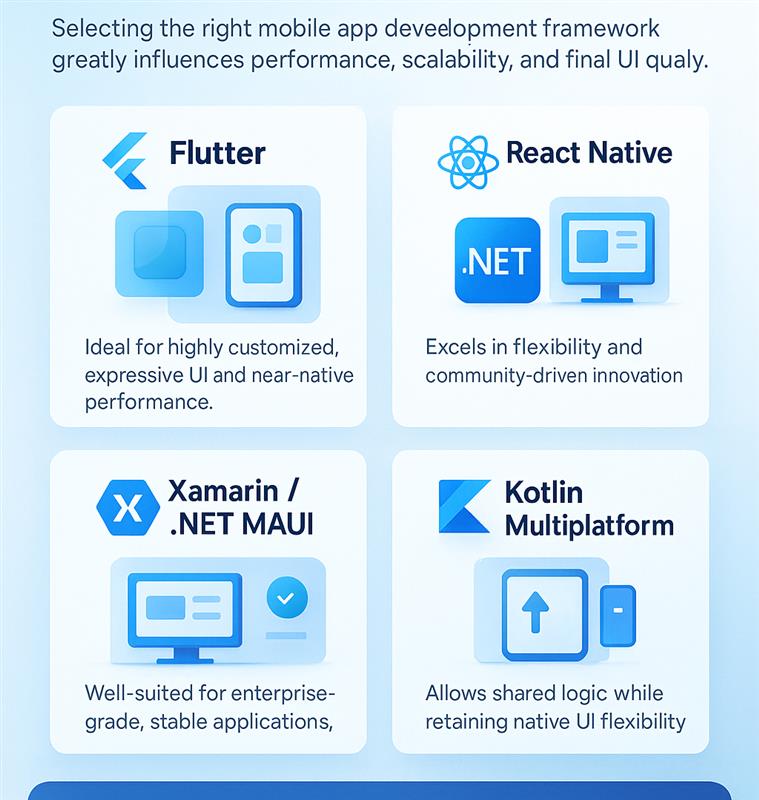
5. Choose a Framework That Aligns With Performance Needs
6. Implement Scalable Architecture Patterns
Structured architecture determines app maintainability and performance.
We rely on modern architectural patterns:
- BLoC / Provider / Riverpod (Flutter)
- Redux / MobX / Recoil (React Native)
- MVVM (Xamarin/.NET MAUI)
A clean separation of concerns prevents performance bottlenecks and accelerates future iterations.
Performance Optimisation Techniques for Cross-Platform Apps
7. Minimise Re-renders and Component Overhead
Unnecessary re-renders slow down UI updates.
We optimise by:
- Using memoisation for components
- Splitting complex views into smaller widgets
- Avoiding deep widget trees
- Leveraging state management effectively
Efficient rendering ensures smoother animations and faster load times.
8. Reduce API Latency with Smart Data Handling
UX relies heavily on backend responsiveness.
We implement:
- Caching and pre-fetching to reduce wait times
- Pagination for heavy data lists
- Offline-first capabilities
Optimised data flow improves the user experience across varying network conditions.
9. Optimise Animations for Native-Like Smoothness
Animations can drastically elevate the UX—but only if they stay smooth.
Best practices include:
- Leveraging hardware-accelerated animations
- Keeping animation durations consistent
- Avoiding heavy computations on the main thread
Fluid motion improves user perception of quality.
Platform-Specific Enhancements for Better User Experience
10. Tailor Features to OS Capabilities
Cross-platform doesn’t mean ignoring the native ecosystem.
We integrate:
- Native APIs for camera, location, and sensors
- Platform channels for device-specific functions
- OS-level gestures and transitions
Users feel instantly familiar with the app, no matter what platform they are on.
11. Adapt UI Layouts for Device-Specific Constraints
Different devices bring different challenges:
- Notches and display cutouts
- Foldable screen layouts
- Varying aspect ratios
- Tablet split screens
UI must remain visually consistent and functional across all device types.
Testing and Validation for Superior Quality
12. Test Across Platforms, Devices, and Screen Sizes
We use automated and manual testing strategies:
- Unit and integration testing
- Golden tests for UI consistency
- Performance profiling
- Real-device testing for latency and responsiveness
Thorough validation ensures a polished and stable end-user experience.
13. Continuously Monitor and Optimise After Deployment
Post-launch optimisation is essential.
We monitor:
- Real-time performance metrics
- Crash logs and error reports
- User behaviour analytics
- Feedback-driven UX improvements
Monarch Innovation emphasises continuous improvement to maintain long-term app excellence.
Conclusion
Delivering exceptional UI and UX in cross-platform apps requires precise design strategies, optimised architecture, seamless integrations, and continuous improvement. By following these best practices, businesses can harness the full potential of cross-platform mobile development and grow their digital presence efficiently. With the expertise of a trusted mobile app development company in India like Monarch Innovation, building high-performance mobile solutions becomes faster, smarter, and more impactful.
FAQs
1. What is the best cross-platform framework for high-performance UI and UX?
Flutter is considered the best for high-performance UI and UX because it uses its own rendering engine and delivers smooth, consistent 60–120 FPS animations. React Native is preferred when teams want strong JavaScript ecosystem compatibility, while Kotlin Multiplatform is ideal for sharing business logic with fully native UI.
2. How can I improve performance in cross-platform mobile apps?
You can boost performance by reducing heavy computations on the main thread, lazy-loading screens, optimizing images, minimizing bridge communication (in React Native), enabling hardware-accelerated animations, and profiling apps regularly using Android Profiler, Xcode Instruments, or framework-specific tools.
3. How do you create a consistent UI and UX across iOS and Android in cross-platform development?
Use a shared design system, responsive layout rules, scalable vector graphics, platform-adaptive components, and accessibility guidelines. Follow native UI conventions where necessary, but maintain consistent branding, spacing, and typography across both platforms.
4. When should you choose cross-platform development instead of native apps?
Choose cross-platform when you want faster development, lower costs, and feature parity across platforms with a single codebase. Use native development only when the app requires highly advanced animations, deep system-level integrations, or extreme performance (e.g., AR, 3D apps, heavy GPU tasks).
5. What are the best practices for testing cross-platform apps to ensure high-quality UI and UX?
Use a mix of automated UI tests, real-device testing, performance profiling, and crash/UX analytics. Implement unit tests for shared logic, widget/component tests for UI stability, and run end-to-end tests on cloud devices to catch platform-specific issues early.