

Every developer has heard it: “It works on my machine.” An app runs perfectly in development, then breaks the moment it hits production. The cause? Mismatched dependencies, different OS configurations, or missing libraries.
This is exactly the problem that Docker was built to eliminate and why Kubernetes exists to take things even further.
As of 2025, over 53% of developers actively use Docker in their workflows, while 96% of enterprises have adopted Kubernetes in some capacity. These aren’t competing tools they solve different problems at different scales. But knowing which to use (and when to use both) is essential for any modern development team.
In this guide by Monarch Innovation, we’ll break down:
- What Docker and Kubernetes actually do.
- How each one works under the hood.
- The core differences between Kubernetes and Docker.
- Real-world use cases for each.
- When to use Kubernetes, Docker, or both together.
Let’s get started.
What Is Containerization? (And Why It Matters)
Before comparing Docker and Kubernetes, it’s important to understand the concept they’re both built around: containerization.
Containerization is a lightweight form of virtualization that packages an application along with all its dependencies, libraries, and configuration into a single portable unit called a container. Unlike traditional virtual machines (VMs), containers share the host operating system’s kernel rather than running a full OS of their own.
This makes containers:
- Lighter — no full OS per instance
- Faster — containers start in seconds, not minutes
- Portable — run the same container on any machine that supports containers
- Consistent — no more “it works on my machine” surprises
Containerization vs. Virtualisation
| Feature | Virtual Machines | Containers |
|---|---|---|
| OS | Full OS per VM | Shared host OS kernel |
| Startup Time | Minutes | Seconds |
| Resource Usage | Heavy | Lightweight |
| Isolation | Strong (hardware-level) | Process-level |
| Portability | Limited | High |
| Best For | Running different OS environments | Scalable app deployment |
VMs are great when you need total isolation or need to run different operating systems on the same hardware. Containers win when you need fast, scalable, and consistent application deployment which is most modern development teams.
What Is Docker? How It Works & Key Features
Docker is an open-source platform for building, shipping, and running containers. Introduced in 2013, Docker made containerization mainstream by giving developers a clean, simple toolset to package any application into a portable container image.
How Docker Works
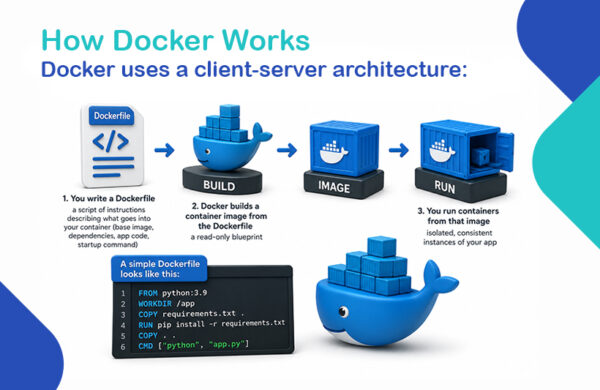
- You write a Dockerfile a script of instructions describing what goes into your container (base image, dependencies, app code, startup command)
- Docker builds a container image from the Dockerfile a read-only blueprint
- You run containers from that image isolated, consistent instances of your app
Docker uses a client-server architecture:
A simple Dockerfile looks like this:
- FROM python:3.9
- WORKDIR /app
- COPY requirements.txt.
- RUN pip install -r requirements.txt
- COPY.
- CMD [“python”, “app.py”]
Run docker build -t my-app. to build the image, then docker run my-app to spin up container instantly anywhere, on any machine.
Key Features of Docker
- Portability — Containers behave identically across laptops, servers, and cloud environments
- Ease of Use — Simple CLI commands and a large ecosystem of pre-built images on Docker Hub
- Lightweight — Shares the host OS kernel, reducing overhead vs full VMs
- Fast Startup — Containers launch in seconds, ideal for rapid development and CI/CD pipelines
- Docker Compose — Define and run multi-container apps with a single YAML file
- Docker Hub — Cloud-based registry for sharing and pulling container images (over 10 million image pulls daily)
When to Use Docker
Docker is the right tool when you need to:
- Standardize local development environments across a team
- Run lightweight or standalone applications without complex orchestration
- Integrate containers into CI/CD pipelines for consistent test and build environments
- Quickly containerize a new service or prototype
What Is Kubernetes? How It Works & Key Features
Kubernetes (often abbreviated as K8s) is an open-source container orchestration platform originally developed by Google and released publicly in 2014. Today it’s maintained by the Cloud Native Computing Foundation (CNCF) and is the industry standard for managing containers on a scale.
Where Docker handles individual containers, Kubernetes manages fleets of containers across multiple machines automatically.
How Kubernetes Works
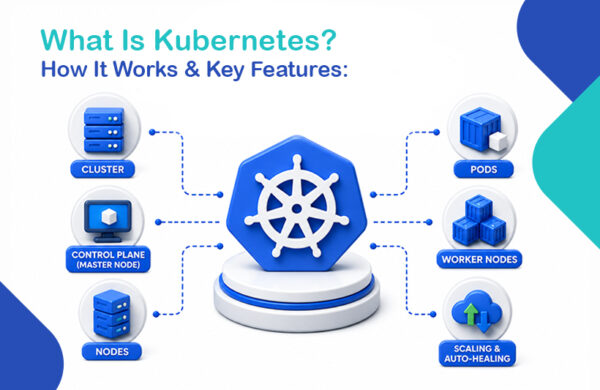
Kubernetes operates on a cluster architecture with three key concepts:
- Cluster — The entire infrastructure, made up of multiple machines (nodes)
- Nodes — Individual machines (physical or virtual) within the cluster
- Control Plane (Master Node) — Manages and makes decisions for the entire cluster (scheduling, scaling, health monitoring)
- Worker Nodes — The machines that actually run your containerized workloads
- Pods — The smallest deployable unit in Kubernetes; a pod contains one or more containers that share network and storage
Kubernetes continuously monitors the desired state you define (e.g., “I want 5 replicas of this service running at all times”) and automatically reconciles any drift restarting failed pods, redistributing workloads, or scaling up when traffic spikes.
Key Features of Kubernetes
- Automated Scaling — Scale pods up or down based on CPU, memory, or custom metrics in real-time
- Self-Healing — Failed containers are automatically restarted; unresponsive nodes are replaced
- Load Balancing — Distributes incoming traffic across healthy container instances
- Rolling Updates — Deploy new versions of your app with zero downtime; roll back instantly if something breaks
- Service Discovery — Containers automatically find and communicate with each other without manual endpoint management
- Secret & Config Management — Securely manage passwords, tokens, and configuration data without exposing them in code
- Multi-Cloud Support — Run workloads across AWS, GCP, Azure, or on-premises from a single control plane
When to Use Kubernetes
Kubernetes is the right tool when you need to:
- Manage hundreds or thousands of containers across multiple servers
- Build and run microservices architectures in production
- Achieve high availability with automatic failover and self-healing
- Scale dynamically based on real-time demand (e.g., e-commerce traffic spikes)
- Run AI/ML training workloads that require GPU orchestration across a cluster
Kubernetes vs Docker: Core Differences Explained
Docker and Kubernetes are not alternatives; they operate different layers of the container lifecycle. Here’s a clear breakdown:
| Reference Point | Docker | Kubernetes |
|---|---|---|
| Primary Role | Build, ship, and run containers | Orchestrate and manage containers at scale |
| Scope | Single containers or small groups | Hundreds to thousands of containers across clusters |
| Strength | Simple setup, consistent dev environments | Automated scaling, self-healing, service discovery |
| Architecture | Client-server (Docker Engine) | Cluster-based (Control Plane + Worker Nodes) |
| Orchestration | Basic (via Docker Compose / Swarm) | Advanced (production-grade, enterprise-ready) |
| Use Case | Local development, CI/CD, lightweight apps | Large-scale production, microservices, distributed systems |
| Learning Curve | Low | Moderate to high |
| Perspective | Developer-first tool | Operations and scaling-first tool |
Key Difference: Container Creation vs Container Orchestration
Think of Docker as the factory that builds and packages your containers. Kubernetes is the logistics manager that decides where every container goes, ensures they’re running, and handles failures when they occur.
Docker answers: “How do I package and run this app?” Kubernetes answers: “How do I keep 500 instances of this app running reliably across 20 servers?”
Docker Swarm vs Kubernetes: Which Orchestrator Wins?
Docker includes its own native orchestration tool called Docker Swarm. Here’s how it compares:
| Feature | Docker Swarm | Kubernetes |
|---|---|---|
| Setup Complexity | Simple | Complex |
| Scalability | Moderate | Enterprise-grade |
| Self-Healing | Basic | Advanced |
| Community & Ecosystem | Smaller | Massive |
| Load Balancing | Built-in, basic | Advanced, configurable |
| Industry Adoption | Declining | Dominant standard |
| Best For | Small teams, simple apps | Large-scale production systems |
Docker Swarm is easier to set up and fine for smaller environments. But Kubernetes has emerged as the clear industry standard for production-grade container orchestration especially at enterprise scale.
Real-World Use Cases: Docker and Kubernetes in Action
Use Case 1: Microservices Architecture
Modern applications are broken into smaller, independent services (microservices). Docker packages each microservice into its own container. Kubernetes manages communication between services, scales individual components, and handles failures automatically.
Example: An e-commerce platform with separate services for payments, inventory, notifications, and user auth. Docker containerizes each service. Kubernetes ensures that if the payment service is overwhelmed on Black Friday, new instances spin up in seconds without touching anything else.
Use Case 2: CI/CD Pipelines
Docker ensures that every stage of your CI/CD pipeline from code commit to testing to deployment runs in an identical, reproducible environment. Kubernetes then automates rolling deployments to production, making zero-downtime releases the default.
Use Case 3: AI/ML Workloads
Training machine learning models require high-performance computing resources like GPUs. Kubernetes orchestrates these workloads across a cluster, ensuring compute resources are allocated efficiently and jobs are retired on failure without manual intervention.
Use Case 4: Multi-Cloud & Hybrid Deployments
Kubernetes allows teams to run the same containerized workloads across AWS, GCP, Azure, or on premises from a single control plane. This eliminates cloud vendor lock-in and gives enterprises flexibility to move workloads where they’re most cost-effective.
Can Kubernetes and Docker Work Together?
Yes — and they’re designed too.
Docker and Kubernetes complement each other perfectly:
- Developers use Docker to containerize applications during development and testing
- Operations teams use Kubernetes to deploy, scale, and manage those containers in production
A typical workflow looks like this:
- Developer writes code and creates a Docker file
- Docker builds a container image and pushes it to a registry (e.g., Docker Hub or a private registry)
- Kubernetes pulls that image and deploys it as pods across a cluster
- Kubernetes monitors health, scales on demand, and handles failures automatically
While Kubernetes can work with other container runtimes (like container or CRI-O), Docker remains one of the most common ways teams build and manage container images before handing them off to Kubernetes
Which Should You Choose: Kubernetes or Docker?
Choose Docker when:
- You’re building or testing an app locally
- You have a small team or a simple application
- You need a fast, lightweight solution without orchestration overhead
- You’re setting up CI/CD pipelines
Choose Kubernetes when:
- You’re running distributed, microservices-based applications in production
- You need automated scaling, self-healing, and zero-downtime deployments
- You’re managing enterprise-level workloads with high availability requirements
- You’re running AI/ML workloads or multi-cloud deployments
Use Both when:
- You want Docker for development and image building + Kubernetes for production orchestration
- Your team is scaling from startup to enterprise
- You need the full container lifecycle covered from code to cloud
A good rule of thumb from the industry: Startups and small teams start with Docker and Docker Compose. Add Kubernetes when you hit real scaling challenges.
Conclusion
Docker and Kubernetes are both essential pillars of modern software infrastructure, but they serve distinct roles.
Docker solves the “it works on my machine” problem by packaging applications into consistent, portable containers. Kubernetes solves the “how do we run 1,000 of these containers reliably at scale” problem with powerful orchestration, automated scaling, and self-healing.
For most teams, the answer isn’t Docker or Kubernetes it’s Docker and Kubernetes, working together across the development and production lifecycle.
At Monarch Innovation, we help businesses architect, build, and scale cloud-native infrastructure using Docker, Kubernetes, and modern DevOps best practices. Whether you’re containerizing your first app or orchestrating enterprise-scale microservices, our team has the expertise to guide you.
Ready to modernize your infrastructure? Get in touch with Monarch Innovation today →
FAQ: Kubernetes vs Docker
Q: Is Kubernetes replacing Docker?
No. Kubernetes orchestrates containers it doesn’t build them. Docker remains the most popular tool for creating container images. They work together, not against each other.
Q: Can I use Kubernetes without Docker?
Yes. Kubernetes supports multiple container runtimes including containerd and CRI-O. However, Docker is still the most widely used image-building tool in the ecosystem.
Q: What does Docker Compose and how is it different from Kubernetes?
Docker Compose lets you define and run multi-container applications on a single host ideal for local development. Kubernetes manages containers across multi-machine clusters with advanced orchestration, scaling, and self-healing. Compose is for development; Kubernetes is for production.
Q: Is Kubernetes hard to learn?
Kubernetes has a steeper learning curve than Docker due to its complex cluster architecture. However, managed services like Amazon EKS, Google GKE, and Azure AKS significantly reduce the operational burden.
Q: What is a Kubernetes pod?
A pod is the smallest deployable unit in Kubernetes. It contains one or more containers that share the same network and storage resources. Pods are ephemeral Kubernetes creates, destroys, and replaces them automatically based on your configuration.