$29.99
ONE-TIME LICENSE
1.0.3
CURRENT VERSION
Windows 64
OPERATING SYSTEM
2.4 MB
DOWNLOAD SIZE

OVERVIEW
iProperty Manager allows you to set and edit all iProperties — including custom properties — for a complete assembly and all its references from a single interface. Select which properties to override, feed metadata to sub-parts and sub-assemblies, or apply changes only to the currently open document. Add or remove custom iProperties as needed, ensuring consistent part numbers, descriptions, materials, and project data across every linked file without opening each one individually.
Where teams use it
BOM preparation workflows that require accurate part numbers and descriptions before export. Engineering change orders where material, revision, or status properties need to propagate across an entire assembly. Any process where consistent, up-to-date iProperty metadata across all referenced files is critical to downstream manufacturing or documentation.
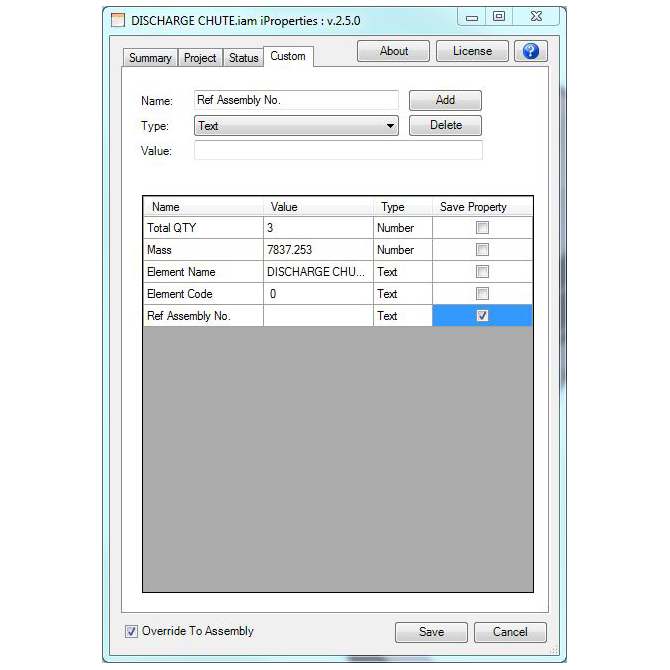
CAPABILITIES
Four core behaviors cover the day-to-day reality of managing large, deeply-referenced Inventor assemblies.
Saves all referenced parts, assemblies, and drawings tied to the active assembly in one automated pass.
Built for workflows where rules trigger on file Open or Save events and must run across every linked document.
Step through a sequence of drawings for quality checks without manually opening and closing each one.
Runs the open-save-close cycle in auto mode across all referenced documents of an assembly.
Trial-to-paid activation flow with a license key issued directly by the Monarch support team.
Works across Autodesk Inventor and Inventor Professional, versions 2013 through 2022.
DETAILS
Current Version
1.0.3
Last Updated
11 Nov 2024
Release Date
22 August 2024
Language
English
Operating System
Windows 64
Download Size
1.1 MB
Compatible With
Autodesk Inventor (Version: 2025)
Autodesk Inventor Professional (Version: 2025)
Customer Support
info@monovative.com
CHANGELOG
1.0.3
11 November 2024
Bug-Fix: Broken link in the About Form
1.0.2
11 October 2024
Added UI for Setup Installation
1.0.1
29 August 2024
Added About Form
1.0.0
22 August 2024
Created new 'iProperty Tool' for Inventor 2025
LICENSING
Application Name has 7 days trial license. For complete license user needs to get license key
On the first launch of iProperty Manager, the license window will pop up. On main screen user can select appropriate options as shown in following figure.
User has to fill all the details and send to "info@monovative.com". User can also click "Send Mail" to request for the license.
Once request is made and license key is received, user can select "Activate license with license key" and go to next panel.
In this panel user has to enter the received license key and press "Activate" button. This will activate the complete license.
*NOTE: The installation of the product requires the administrator privileges. Same privileges are necessary for managing the license.
MORE FROM MONARCH
