$29.99
LICENCE À UTILISATION UNIQUE
1.0.3
VERSION ACTUELLE
Windows 64
SYSTÈME D'EXPLOITATION
2.4 MB
TAILLE DU FICHIER À TÉLÉCHARGER

PRÉSENTATION GÉNÉRALE
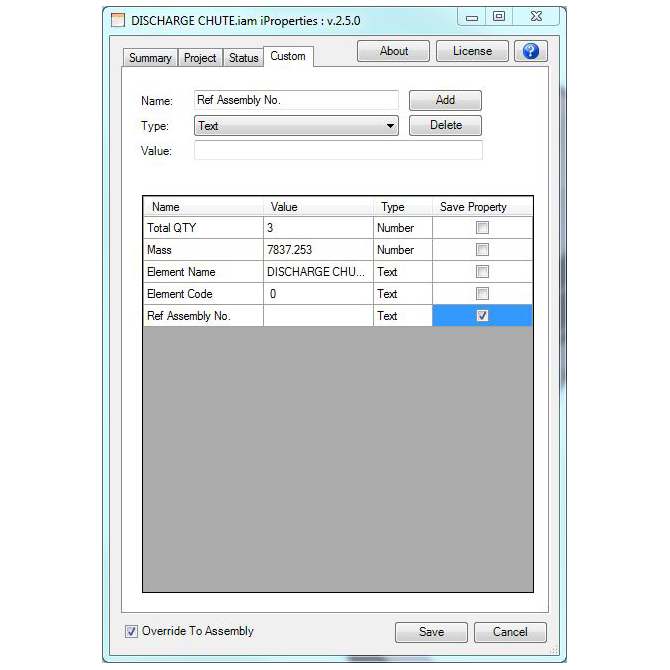
iProperty Manager vous permet de définir et de modifier toutes les iProperties — y compris les propriétés personnalisées — d'un assemblage complet et de toutes ses références à partir d'une interface unique. Sélectionnez les propriétés à remplacer, transmettez des métadonnées aux sous-pièces et sous-assemblages, ou appliquez les modifications uniquement au document actuellement ouvert. Ajoutez ou supprimez des iProperties personnalisées selon vos besoins, en garantissant la cohérence des références, des descriptions, des matériaux et des données de projet dans tous les fichiers liés, sans avoir à les ouvrir un par un.
Où les équipes l'utilisent-elles ?
Les processus de préparation des nomenclatures qui nécessitent des références et des descriptions précises des pièces avant l'exportation. Les ordres de modification technique dans lesquels les propriétés relatives aux matériaux, aux révisions ou aux statuts doivent être répercutées sur l'ensemble d'un assemblage. Tout processus dans lequel la cohérence et l'actualité des métadonnées iProperty dans tous les fichiers référencés sont essentielles pour la fabrication ou la documentation en aval.
COMPÉTENCES
Quatre comportements clés résument la réalité quotidienne de la gestion d'assemblages Inventor volumineux et comportant de nombreuses références.
Enregistre toutes les pièces, tous les assemblages et tous les plans référencés liés à l'assemblage actif en une seule opération automatisée.
Conçu pour les flux de travail dans lesquels des règles se déclenchent lors de l'ouverture ou de l'enregistrement d'un fichier et doivent s'appliquer à tous les documents associés.
Parcourez une série de dessins pour effectuer des contrôles qualité sans avoir à ouvrir et fermer manuellement chacun d'entre eux.
Exécute le cycle « ouvrir-enregistrer-fermer » en mode automatique sur tous les documents référencés d'un assemblage.
Processus de passage de la version d'essai à la version payante avec une clé de licence délivrée directement par l'équipe d'assistance de Monarch.
Fonctionne avec Autodesk Inventor et Inventor Professional, versions 2013 à 2022.
DÉTAILS
Version actuelle
1.0.3
Dernière mise à jour
11 Nov 2024
Date de sortie
22 August 2024
Langue
English
Système d'exploitation
Windows 64
Taille du fichier à télécharger
1.1 MB
Compatible avec
Autodesk Inventor (Version: 2025)
Autodesk Inventor Professional (Version: 2025)
Service client
info@monovative.com
JOURNAL DES MODIFICATIONS
1.0.3
11 November 2024
Correction d'un bug : lien rompu dans le formulaire « À propos »
1.0.2
11 October 2024
Ajout d'une interface utilisateur pour la configuration de l'installation
1.0.1
29 August 2024
Ajout de la rubrique « À propos »
1.0.0
22 August 2024
Création d'un nouvel « outil iProperty » pour Inventor 2025
CONCESSION DE LICENCES
L'application « Nom de l'application » dispose d'une licence d'essai valable 7 jours. Pour obtenir une licence complète, l'utilisateur doit se procurer une clé de licence.
Lors du premier lancement d'iProperty Manager, la fenêtre de licence s'affiche. Sur l'écran principal, l'utilisateur peut sélectionner les options appropriées, comme le montre l'illustration suivante.
L'utilisateur doit remplir tous les champs et envoyer le formulaire à « info@monovative.com ». Il peut également cliquer sur « Envoyer un e-mail » pour demander la licence.
Une fois la demande effectuée et la clé de licence reçue, l'utilisateur peut sélectionner « Activer la licence avec la clé de licence » et passer à l'écran suivant.
Dans ce panneau, l'utilisateur doit saisir la clé de licence reçue et cliquer sur le bouton « Activer ». Cela permettra d'activer la licence complète.
*REMARQUE : l'installation du produit nécessite des droits d'administrateur. Ces mêmes droits sont nécessaires pour gérer la licence.
AUTRES ARTICLES DE MONARCH
